Lists and tuples are sequence objects that allow us to retrieve an element using a specific index. But some applications require a more flexible way to access information. For example, we might want to retrieve information about a student based on their student id rather than an index. In programming terminology, we call this a key-value pair. We access the value (student information) associated with a particular key (student id). In computer science, this kind of data access is called hashing or mapping.
Python supports a built-in hashing data type called a dictionary. To create a dictionary, you list key-value pairs, separated by commas, and enclosed in curly braces { }. Keys and values are joined with a colon (:).
|
1 2 3 4 |
password = { "vik":"hacker", "turing":"genius", "gates":"rich" } # displays: {'vik': 'hacker', 'turing': 'genius', 'gates': 'rich'} print(password) |
The main purpose of a dictionary is to be able to look up the value associated with a particular key like so:
|
1 2 |
print(password["vik"]) # displays: hacker print(password["turing"]) # displays: genius |
If you use a key that does not exist in the dictionary, you will cause a KeyError exception to occur. The best way to avoid this is to check if the key exists in the dictionary using the familiar in keyword before you try to do a look-up. For example:
|
1 2 3 4 5 |
if "gates" in password: print("The password for Bill Gates is:", password["gates"]) else: print("Never heard of this user.") |
Like lists, dictionaries are mutable. This means that you can add, delete (using the del keyword or pop() method), or change a key-value pair at any time.
|
1 2 3 4 5 6 |
del password["turing"] # delete the "Turing" key-value pair password.pop("gates") # another way to delete a key-value pair using pop() method password["newbie"] = "password" # add a new key-value pair password["vik"] = "secret" # change a value print(password) # displays: {'vik': 'secret', 'newbie': 'password'} |
You can see that the password for key ‘vik’ has been changed to ‘secret’. Each key must be unique, and immutable. A key may only refer to one value.
Dictionary Methods
Python dictionaries support several handy built-in methods.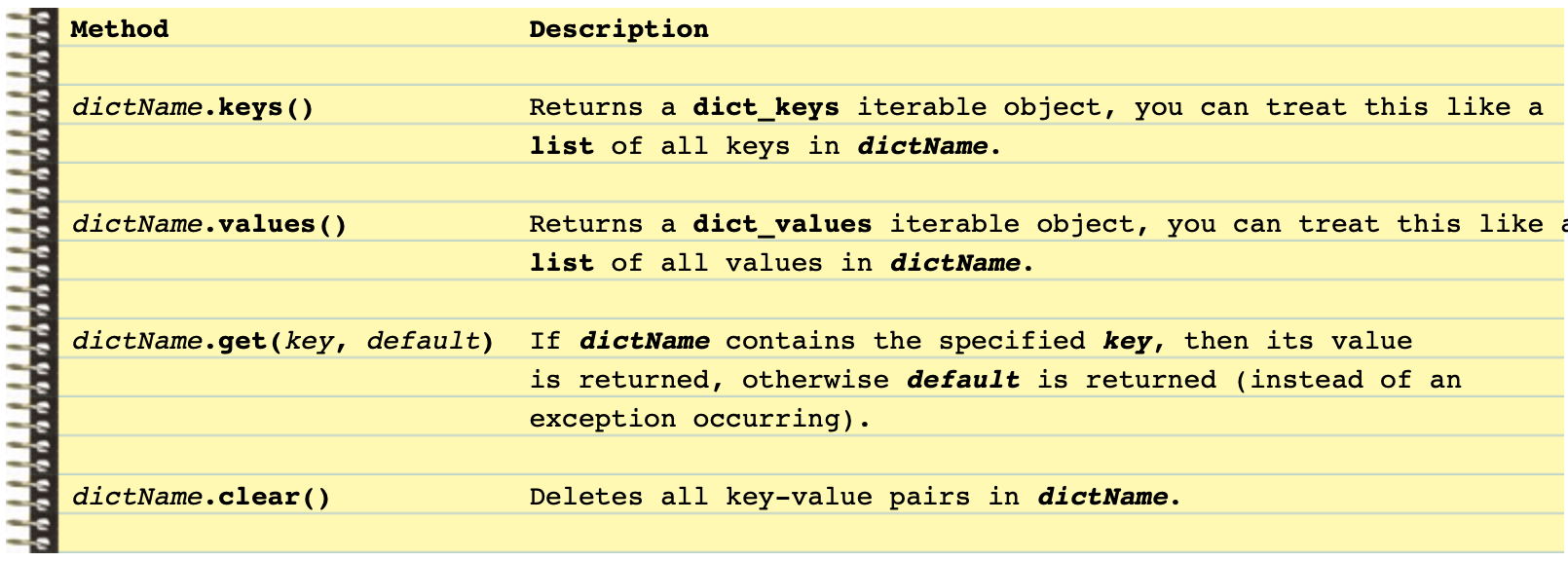
Most of these methods are self-explanatory, here is an example to demonstrate:
|
1 2 3 4 5 6 7 8 9 10 11 12 13 14 15 16 17 |
password = { "vik":"hacker", "turing":"genius", "gates":"rich" } print(password) # displays: {'vik': 'hacker', 'turing': 'genius', 'gates': 'rich'} print(password.keys()) # displays: dict_keys(['vik', 'turing', 'gates']) print(password.values()) # displays: dict_values(['hacker', 'genius', 'rich']) print("vik" in password) # displays: True print("newbie" in password) # displays: False print(password.get('gates', 'not defined')) # displays: rich print(password.get('newbie', 'not defined')) # displays: not defined password.clear() print(password) # displays: { } |
Data Type Round-Up!
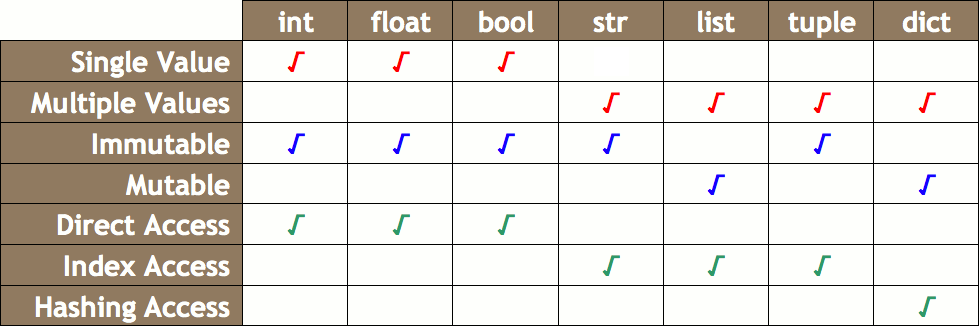
We’ve discussed integers, floats, strings, Booleans, lists, tuples, and dictionaries.. whew! Let’s recap what we know about these types so that we can see how they fit together. There are three ways that one can look at a data type in Python:
-
- What They Store: A data type can either store a single value (int, float, bool) or hold multiple values (strings, lists, tuples, dictionaries).
- How They Are Updated: A data type can either be immutable (int, float, bool, string, tuple) or mutable (lists, dictionaries). We have learned that if you pass an immutable type into a function, and the function attempts to change the parameter variable, then the original value passed into the function is not changed. We called this pass-by-value. We also learned that if you pass a mutable type into a function, and the function attempts to change the parameter variable, then the original value passed into the function is changed. We called this pass-by-reference.
- How Data Is Accessed: A data type can either be accessed directly using the variable name (int, float, bool), using an index (strings, lists, tuples), or by hashing (dictionaries).
This table summarizes all that we have learned about Python data types:
You Try!
-
- Write a program that asks the user to enter 5 different students and their mark out of 100. If the user tries to enter a student twice, the program should detect this and ask them to enter a unique student name (and their mark).
- Create a text file containing several sentences, one per line. Write a program that reads the file’s contents and uses a dictionary to keep track of the number of occurrences of each word in the file. Create a file called report.txt and output the list of words and their frequencies.
- Write a “Geek Translator” application. Starting with the following dictionary definition:
123456geek = {"404": "clueless. From the web error message 404, meaning page not found.","Googling": "searching the Internet for background information on a person.","Keyboard Plaque" : "the collection of debris found in computer keyboards.","Link Rot" : "the process by which web page links become obsolete.","Percussive Maintenance" : "the act of striking an electronic device to make it work.","Uninstalled" : "being fired. Especially popular during the dot-bomb era."}
Write a menu-driven program (with input validation) that gives the user 5 options: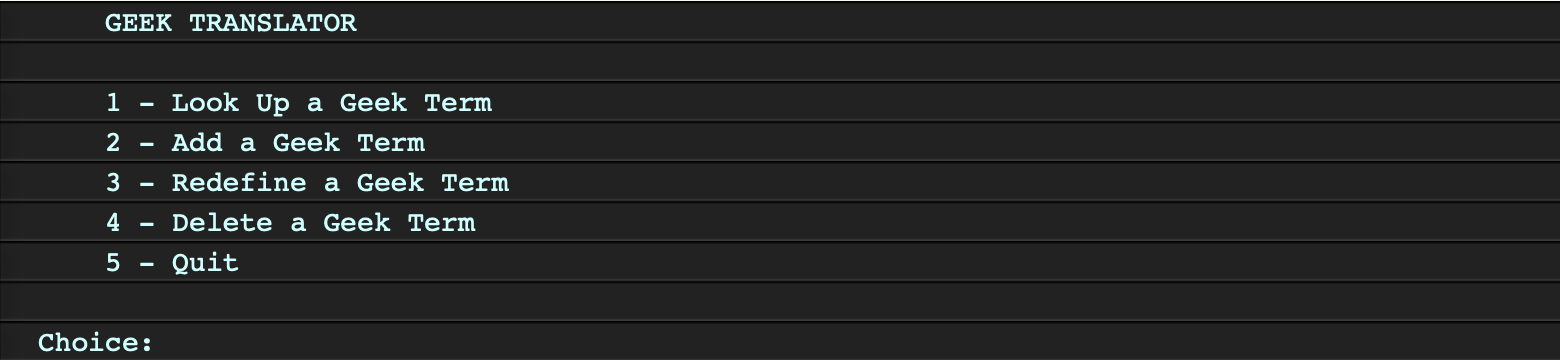
-
-
- Look Up A Geek Term: Should ask the user for a term. If the term exists in the dictionary, its definition should be displayed. Otherwise, the program should display the message “Sorry, I don’t know that term.” The main menu should be displayed again.
-
-
-
- Add a Geek Term: Should ask the user for the new term. If the term does not already exist in the dictionary, the user should be asked for its definition, then the new term and definition should be added and the message “The term has been added.” displayed. If the term already exists, then display the message “That term already exists! Try redefining it.” The main menu should be displayed again.
-
-
-
- Redefine a Geek Term: Should ask the user for a term. If the term exists in the dictionary, its current definition should be displayed and the user should be asked to enter a new definition. The definition should then be changed in the dictionary, and the message “Term has been redefined.” displayed to the user. If the user enters a term that does not exist in the dictionary, display the message “That term doesn’t exist! Try adding it.” The main menu should be displayed again.
-
-
-
- Delete a Geek Term: Should ask the user for a term. If the term exists in the dictionary, the term and its definition should be deleted, then the message “Okay, I deleted the term.” is displayed. If the term does not exist in the dictionary, display the message “Sorry, I don’t know that term.” The main menu should be displayed again.
-
-
-
- Quit: Should terminate the program.
-