Recall 4-1 Q1 asked you to draw two random lines within your custom JPanel. The odd behaviour you should have noticed was that new random lines are generated each time the paintComponent() method is called; i.e., when the window is resized.
Your code might have looked something like this:
|
1 2 3 4 5 6 7 8 9 10 11 12 13 14 15 16 17 18 19 20 |
import java.awt.Graphics; import javax.swing.JPanel; public class DrawPanel extends JPanel { // This method is called automatically by the JVM when the window needs to be (re)drawn. @Override public void paintComponent( Graphics g ) { super.paintComponent( g ); // Get the dimensions of the panel in pixels int panelWidth = getWidth(); int panelHeight = getHeight(); // Draw RANDOM lines g.drawLine( (int)(Math.random() * panelWidth), (int)(Math.random() * panelHeight), (int)(Math.random() * panelWidth), (int)(Math.random() * panelHeight) ); g.drawLine( (int)(Math.random() * panelWidth), (int)(Math.random() * panelHeight), (int)(Math.random() * panelWidth), (int)(Math.random() * panelHeight) ); } } |
But what if we want to generate a random pattern of lines and then maintain the same pattern even as the window is resized? For that, we will use objects to store the attributes of each line between calls to paintComponent().
Let’s create a class to represent a Line:
|
1 2 3 4 5 6 7 8 9 10 11 12 13 14 15 16 17 18 19 20 21 22 23 24 25 |
import java.awt.Color; import java.awt.Graphics; public class Line { private int x1; private int y1; private int x2; private int y2; private Color color; // Constructor to initialize all instance variables public Line( int x1, int y1, int x2, int y2, Color color ) { this.x1 = x1; this.y1 = y1; this.x2 = x2; this.y2 = y2; this.color = color; } // Given a Graphics object (g), this method will draw the current Line object public void draw( Graphics g ) { g.setColor( color ); g.drawLine( x1, y1, x2, y2 ); } } |
This is a very simple class that includes a constructor to initialize the values of the private instance variables: x1, y1, x2, y2, and color. Apart from that, it includes a method called draw() to enable a Line object to draw itself given the Graphics parameter, g.
Next, as usual, we create a custom JPanel:
|
1 2 3 4 5 6 7 8 9 10 11 12 13 14 15 16 17 18 19 20 21 22 23 24 25 26 27 28 29 30 31 32 33 34 35 36 37 38 39 40 41 42 |
import java.awt.Color; import java.awt.Graphics; import java.util.Random; import javax.swing.JPanel; public class DrawPanel extends JPanel { // We'll use a shared array to store 10 Line objects private Line[] lines = new Line[10]; // Constructor instantiates an array of 10 Random Line objects public DrawPanel() { // We'll use the Random class to simplify picking random integers Random randomNumber = new Random(); setBackground( Color.WHITE ); // Create 10 Line objects with random coordinates and colours for ( int count = 0; count < lines.length; count++ ) { // generate random coordinates int x1 = randomNumber.nextInt( 300 ); int y1 = randomNumber.nextInt( 300 ); int x2 = randomNumber.nextInt( 300 ); int y2 = randomNumber.nextInt( 300 ); // generate a random color Color color = new Color( randomNumber.nextInt( 256 ), randomNumber.nextInt( 256 ), randomNumber.nextInt( 256 ) ); // add the line to the array of lines to be displayed lines[ count ] = new Line( x1, y1, x2, y2, color ); } } // This method is called automatically by the JVM when the window needs to be (re)drawn. @Override public void paintComponent( Graphics g ) { super.paintComponent( g ); // Call the draw() method for each Line object in the array for ( Line line : lines ) line.draw( g ); } } |
On line 8 we create an array called lines to store 10 Line objects. The reason it’s a private instance variable is that lines is accessed by both methods in the DrawPanel class. The constructor randomly generates the coordinates and colours for 10 Line objects and stores references to them in the lines array. Rather than using Math.random() to generate random integers I’ve used the Random class – we first used this class in U3-5.
The paintComponent() method simply calls the draw() method for each Line object in the lines array. Since we are no longer generating new lines in paintComponent() but redrawing the ones in the lines array, the state of each Line object is preserved between calls to paintComponent().
Below is a TestDraw class. Try resizing the window and see what (doesn’t) happen!
|
1 2 3 4 5 6 7 8 9 10 11 12 13 14 |
import javax.swing.JFrame; public class TestDraw { public static void main( String[] args ) { JFrame appWindow = new JFrame( "Abstract Art" ); DrawPanel linePanel = new DrawPanel(); appWindow.add( linePanel ); appWindow.setSize( 300, 300 ); appWindow.setDefaultCloseOperation( JFrame.EXIT_ON_CLOSE ); appWindow.setVisible( true ); } } |
You Try!
- In U2 you worked on building a FillableShape hierarchy to represent Rectangle and Oval objects. Use what you learned about abstract classes and methods, inheritance, and polymorphism to create a class hierarchy for Line, Rectangle, and Oval objects, including a draw() method for each shape type. Build your shape hierarchy based on the UML diagram below:

Create a DrawPanel class to generate a random mixture of 10 shapes like so:
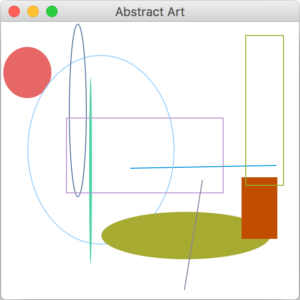 Notes:
- FillableShape methods getUpperLeftX() and getUpperLeftY() should return the smaller of the x1, x2 and y1, y2 values respectively.
- FillableShape methods getWidth() and getHeight() should return the absolute difference between the x1, x2 and y1, y2
- Enhance the DrawPanel class such that it uses an ArrayList to store a random mixture of 10 (in total) Line, Oval, and Rectangle objects generated in the constructor. Use polymorphism so that only one ArrayList is required.